> For the complete documentation index, see [llms.txt](https://docs.dexa.im/llms.txt). Markdown versions of documentation pages are available by appending `.md` to page URLs; this page is available as [Markdown](https://docs.dexa.im/non-dma-products/rust/oxide/setup-guide.md).
# Setup Guide
## Introduction
This product is an external cheat. Read more about cheat types here - [Types of Cheats](/learn/resources/types-of-cheats.md)
{% hint style="danger" %}
**Never** use game accounts you care about with cheats. Always use alternate accounts.
{% endhint %}
## Setup Guide
{% hint style="info" %}
Do **not** skip steps. Our products are **only** compatible with official builds of Windows 10 & 11. If you need to reinstall Windows, see [Clean Windows Install](/learn/resources/windows-10-and-11-guides/clean-windows-install.md)
{% endhint %}
### 1. Preparing Windows
* Update your video card (GPU) drivers:
* [NVIDIA GPU drivers](https://www.nvidia.com/en-us/geforce/drivers/)
* or [AMD GPU drivers](https://www.amd.com/en/support/download/drivers.html)
* Download & install:
* Microsoft [Visual C++ Redistributables](https://learn.microsoft.com/en-us/cpp/windows/latest-supported-vc-redist?view=msvc-170#latest-microsoft-visual-c-redistributable-version)
* Microsoft [.NET framework](https://dotnet.microsoft.com/en-us/download) (v8.0) & [.NET framework](https://dotnet.microsoft.com/en-us/download/dotnet-framework/thank-you/net481-web-installer) (v4.8.1)
* Microsoft [DirectX End-User Runtimes](https://www.microsoft.com/en-us/download/details.aspx?id=35)
### 2. Removing Antivirus & Anti-cheat
* Uninstall all third-party [antivirus software](#user-content-fn-1)[^1]
* Uninstall all third-party [anti-cheat software](#user-content-fn-2)[^2]
For example, Riot's Vanguard anti-cheat.
{% hint style="info" %}
**Do not uninstall** Easy Anti-cheat (EAC) or BattlEye.
{% endhint %}
### 3. Disable Security Settings
{% embed url="" %}
Disable security settings, including real-time protection, tamper protection, and memory integrity.
{% endembed %}
#### Download Sordum Defender Control
{% hint style="info" %}
If the link below does not work, download from the [**official site here.**](https://www.sordum.org/9480/defender-control-v2-1/)
{% endhint %}
{% file src="/files/Ov91kkLbdYDhaexYJaX0" %}
Sordum Defender Control
{% endfile %}
### 4. Enter BIOS
* Press Start -> type `cmd` -> type `shutdown /r /fw` press `ENTER`
* this will reboot the PC and enter the BIOS
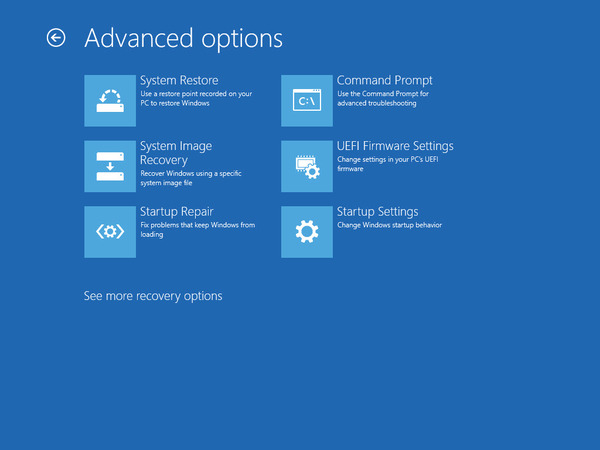
* if it does not, choose the UEFI Firmware Settings to enter BIOS
Choose the UEFI Firmware Settings option.
### 5. Disable Secure Boot
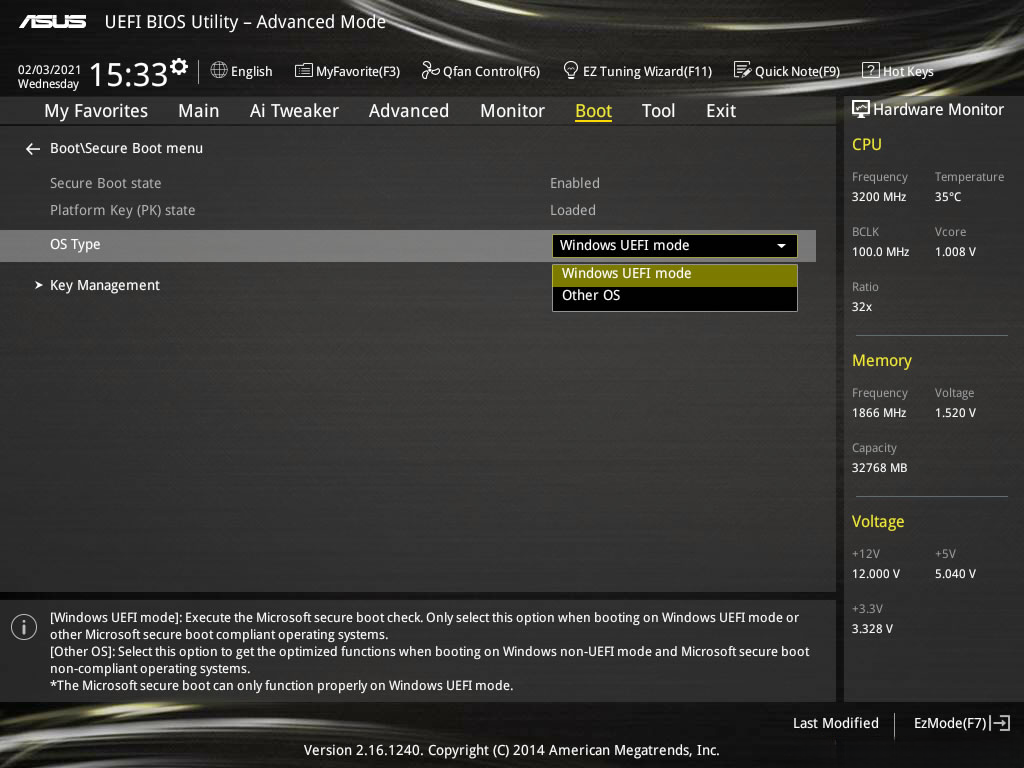
* Locate the setting named *Secure Boot*, typically located in *Advanced* or *Boot* menus
* Disable Secure Boot
* sometimes, Secure Boot may have boot keys or secure keys; you can (in most cases) delete these keys, and then disable secure boot
* you cannot disable secure boot with keys active; you must delete them first to modify the secure boot state
Example of the ASUS BIOS.
### 6. Finishing up in BIOS
* Save changes and exit BIOS (typically, press F10 to save changes & reboot)
* Reboot the PC
### 7. Preparing the Game
* Launch the game
* change video settings to `borderless windowed mode` or `windowed mode`
* verify the game's resolution matches the [monitor's display resolution](ms-settings:display)
* save any changes
* close the game
### 9. Setup SteelSeries Moments
The OXIDE loader utilizes SteelSeries Moments to inject and interact with Rust.
* [Sign up or log in](https://steelseries.com/signup) to SteelSeries
* Download & install [SteelSeries Moments](https://steelseries.com/gg/moments/download)
### 10. Preparing the Loader
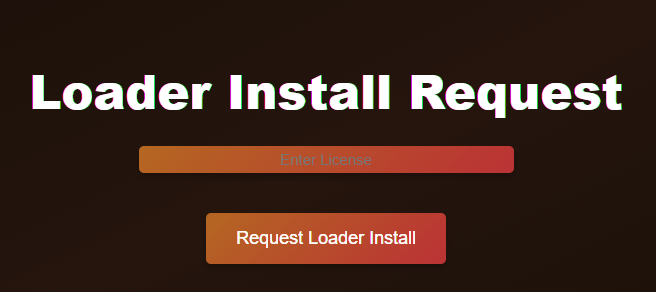
* Head over to the [client panel](https://dexa.im/oxide-loader)
* Check [your order](https://account.dexa.im/orders) and paste your `license key` in the `enter license` field
* Click the `request loader install` button
* Right-click -> `run as administrator` on the loader[^3] file
* Register an account or log in to the loader
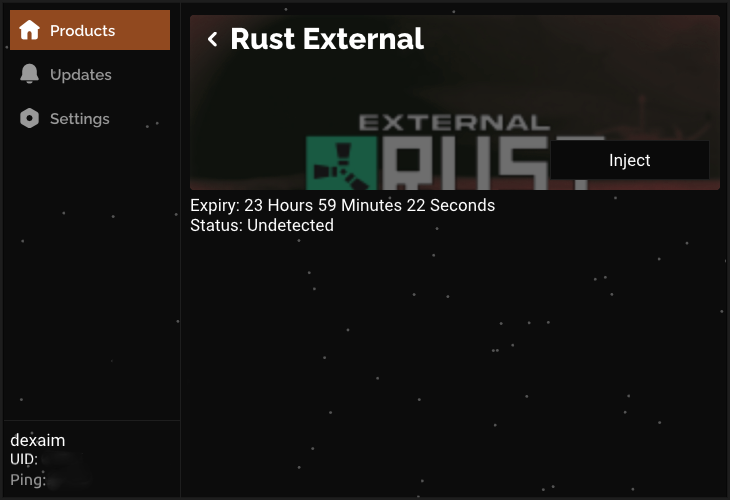
* After logging in, click Rust
* Click `Inject`
* the loader will now wait for SteelSeries Moments to be open if it is not already open
* at this stage, the loader may prompt you to reboot the PC
* after the reboot completes, run the loader again, inject the Rust cheat
* at the Injection Successful popup, (if applicable) use [your spoofer](https://dexa.im/products/hardware-spoofer) to spoof at this step
* close the spoofer when finished spoofing
{% hint style="info" %}
This product uses the DEX-D[^4] loader.
{% endhint %}
The DEX-D loader.
* Open Rust
* Press `INS` on the keyboard
* The menu will appear.
{% hint style="success" %}
Setup complete!
{% endhint %}
## Need help with bans, VPNs, spoofers & more?
Take a look at our Resources page:
{% embed url="" %}
## Rust Bans
Rust issues more complex bans compared to other games. We have a detailed ban guide for Rust here:
{% embed url="" %}
[^1]: For example: AVAST, AVG, McAfee, Malwarebytes, etc.
[^2]: For example: Riot Vanguard, ESEA, FACEIT, etc.
[^3]: Depending on the product, **this is usually a .exe or a .bat file named "loader.exe."**
In some cases, these files may be random characters/numbers.
[^4]: The DEX-D loader is used with our Rust product only at this time.
---
# Agent Instructions
This documentation is published with GitBook. GitBook is the documentation platform designed so that both humans and AI agents can read, navigate, and reason over technical content effectively. Learn more at gitbook.com.
## Querying This Documentation
If you need additional information that is not directly available in this page, you can query the documentation by asking a question.
Perform an HTTP GET request on the following URL with the `ask` and `goal` query parameters:
```
GET https://docs.dexa.im/non-dma-products/rust/oxide/setup-guide.md?ask=&goal=
```
`ask` is the immediate question: it should be specific, self-contained, and written in natural language.
`goal` is what the user is ultimately trying to achieve, the reason they need the answer. Sharing it helps GitBook give you a better, more relevant answer. A goal is most helpful when it describes the outcome the user wants rather than restating the question. For example, with `ask=how do I create an API token`, a goal like `automate deployments from our CI pipeline` lets GitBook tailor the answer to that use case.
The response will contain a direct answer to the question and relevant excerpts and sources from the documentation.
Use this mechanism when the answer is not explicitly present in the current page, you need clarification or additional context, or you want to retrieve related documentation sections.
.jpg?alt=media&token=b8f4cebd-22c9-4fe4-a3b9-accfc517b7ce)