> For the complete documentation index, see [llms.txt](https://docs.dexa.im/llms.txt). Markdown versions of documentation pages are available by appending `.md` to page URLs; this page is available as [Markdown](https://docs.dexa.im/non-dma-products/call-of-duty/noir/using-the-menu.md).
# Using the Menu
Most of our products utilize a "menu." These menus allow you to enable or disable certain functions to your liking.
## How to Use
* Press the INS[^1] key to open/close the menu
* To use a controller, [Controller Setup](/non-dma-products/call-of-duty/charlie/controller-setup.md)
The menu for NOIR contains several features. You can fully customize how the aimbot works, the aimbot mode, FOV[^2], recoil control, dead zone & much more.
If unsure what a specific feature does, move your mouse over the \[?] to learn more.
The 'aimbot' menu tab.
### Unlock All
{% hint style="danger" %}
The `unlock all` feature is considered to be risky. **Use at your own discretion.** Using this feature on a low-level account is likely to result in a high number of player reports.
{% endhint %}
This feature works by sequentially forcing unlocks when the game is launched. This process occurs just before arriving at the main menu.
{% hint style="warning" %}
Sometimes, on older PCs, `unlock all` will fail to complete fully. If it fails, close the game and start the injection process again.
{% endhint %}
Follow these steps to use `Unlock All`
1. Make sure `Unlock All` is toggled on in the menu. It must be toggled on before the game is launched; it may be necessary to restart the game after turning it on.
2. Create/edit the desired loadout(s)
3. In the pre-match lobby, duplicate the loadout(s) by right clicking and selecting "Duplicate"
{% hint style="info" %}
`Unlock All` is a soft unlock. These steps must be followed for every game session.
Operator skins will only unlock in Ranked Multiplayer
{% endhint %}
#### Unlock all not working, not unlocking
* Reboot PC and attempt re-injection again
## Account Restriction Messages
NOIR can pull otherwise hidden account statuses from the client. It will display a 0x code at the bottom of the screen. This code corresponds with the classification of account restriction listed below.
#### Generic Restrictions
0x1   - Multiplayer Live Ban
0x2   - Multiplayer Custom Ban
0x3   - Multiplayer Leaderboards Ban
0x4   - Multiplayer Prestige Ban
0x5   - Multiplayer Prestige Extras Ban
0x6   - Multiplayer Tournaments Ban
0x7   - Co-op Live Ban
0x8   - Co-op Custom Ban
0x9   - Co-op Leaderboards Ban
0xA   - UGC Emblems Ban
0xB   - UGC Paintjobs Ban
0xC   - UGC Helmets Ban
0xD   - Global Hosting Ban
0xE   - Global Dedicated Server Find Ban
0xF   - Global Dedicated Server Allocate Ban
0x10  - Global Splitscreen Ban
0x11  - Global Clan Tag Ban
0x12  - Global Voice Chat Ban
0x13  - Global Livestreaming Ban
0x14  - Global Crossplay Ban
0x15  - Global Debug Text Ban
0x16  - Global VIP Ban
0x17  - Global Match Recording Ban
0x18  - Global Celebrity Match Ban
0x19  - Global Streamer Mode Ban
#### Datacenter Restrictions
```
0x12C - Datacenter Restriction 300
0x12D - Datacenter Restriction 301
0x12E - Datacenter Restriction 302
0x12F - Datacenter Restriction 303
0x130 - Datacenter Restriction 304
0x131 - Datacenter Restriction 305
0x132 - Datacenter Restriction 306
0x133 - Datacenter Restriction 307
0x134 - Datacenter Restriction 308
0x135 - Datacenter Restriction 309
0x136 - Datacenter Restriction 310
0x137 - Datacenter Restriction 311
0x138 - Datacenter Restriction 312
```
#### Studio Restrictions
```
0x190 - Studio Watermark Whitelist Ban
0x191 - Studio Shadow Voice Mute Private
0x192 - Studio Shadow Voice Mute Public
0x193 - Studio Shadow Text Mute Game Lobby
0x194 - Studio Shadow Text Mute Private Lobby
0x195 - Studio Shadow Text Mute All
0x196 - Studio Clantag Whitelist Ban
0x197 - Studio Watermark CSV Ban
0x198 - Studio Text Chat Ban
```
#### Other Restrictions
```
0x3E8 - Trace file(s) and/or HWID flags
0x3E9 - Shadowban
0x3EA - On Watchlist
```
### Shadow-ban Bypass
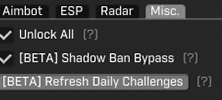
Many people misunderstand our popular NOIR feature, the "shadow-ban bypass," as a feature that removes shadow bans. However, **the shadow-ban bypass feature does not remove active shadow-bans** on an account.
The shadow-ban bypass feature within the CHARLIE menu.
The shadow-ban bypass feature is a *proactive* feature. It works by monitoring active reports moving through your Call of Duty client. By this, we mean that when another player reports you, your client will receive & send specific [telemetry data](#user-content-fn-3)[^3] to the Call of Duty servers.
Our bypass blocks these requests entirely. This helps mitigate up to 90% of shadow-bans in our internal testing.
Additionally, the shadow-ban bypass feature works to mitigate other shadow-ban vectors[^4].
#### Can I still be shadow-banned with this enabled?
The short answer is *yes*. It is virtually impossible to prevent *all* shadow bans. The more shadow-bans you receive, the easier it is to receive them. When this happens, the PC is flagged. Learn more about this in [Bans & Shadowbans](/non-dma-products/call-of-duty/bans-and-shadowbans.md).
[^1]: the INSERT key on your keyboard
[^2]: field of view
[^3]: Telemetry data refers to data points; for example, we collect the IP address in use, how long the software was in use, date & time, hardware information such as OS, game version, etc.
[^4]: Vector is a fancy word used in the cheat industry for "data points." Cheats are detected via certain "points" or "features" of them, also called detection vectors.
---
# Agent Instructions
This documentation is published with GitBook. GitBook is the documentation platform designed so that both humans and AI agents can read, navigate, and reason over technical content effectively. Learn more at gitbook.com.
## Querying This Documentation
If you need additional information that is not directly available in this page, you can query the documentation dynamically by asking a question.
Perform an HTTP GET request on the current page URL with the `ask` query parameter, and the optional `goal` query parameter:
```
GET https://docs.dexa.im/non-dma-products/call-of-duty/noir/using-the-menu.md?ask=&goal=
```
`ask` is the immediate question: it should be specific, self-contained, and written in natural language.
`goal` is optional and describes the broader end goal you are ultimately trying to accomplish on behalf of the user. GitBook uses it to tailor the answer towards what is most useful for that goal.
The response will contain a direct answer to the question and relevant excerpts and sources from the documentation.
Use this mechanism when the answer is not explicitly present in the current page, you need clarification or additional context, or you want to retrieve related documentation sections.
.png?alt=media)