> For the complete documentation index, see [llms.txt](https://docs.dexa.im/llms.txt). Markdown versions of documentation pages are available by appending `.md` to page URLs; this page is available as [Markdown](https://docs.dexa.im/non-dma-products/arc-raiders/rift/setup-guide.md).
# Setup Guide
## Introduction
This product is an external cheat. Read more about cheat types here - [Types of Cheats](/learn/resources/types-of-cheats.md)
{% hint style="danger" %}
**Never** use game accounts you care about with cheats. Always use alternate accounts.
{% endhint %}
## Setup Guide
{% hint style="info" %}
Do **not** skip steps. Our products are **only** compatible with official builds of Windows 10 & 11. If you need to reinstall Windows, see [Clean Windows Install](/learn/resources/windows-10-and-11-guides/clean-windows-install.md)
{% endhint %}
### 1. Preparing Windows
* Update your video card (GPU) drivers:
* [NVIDIA GPU drivers](https://www.nvidia.com/en-us/geforce/drivers/)
* or [AMD GPU drivers](https://www.amd.com/en/support/download/drivers.html)
* Download & install:
* Microsoft [Visual C++ Redistributables](https://learn.microsoft.com/en-us/cpp/windows/latest-supported-vc-redist?view=msvc-170#latest-microsoft-visual-c-redistributable-version)
* Microsoft [.NET framework](https://dotnet.microsoft.com/en-us/download) (v8.0) & [.NET framework](https://dotnet.microsoft.com/en-us/download/dotnet-framework/thank-you/net481-web-installer) (v4.8.1)
* Microsoft [DirectX End-User Runtimes](https://www.microsoft.com/en-us/download/details.aspx?id=35)
### 2. Removing Antivirus & Anti-cheat
* Uninstall all third-party [antivirus software](#user-content-fn-1)[^1]
* Uninstall all third-party [anti-cheat software](#user-content-fn-2)[^2]
For example, Riot's Vanguard anti-cheat.
{% hint style="info" %}
**Do not uninstall** Easy Anti-cheat (EAC) or BattlEye.
{% endhint %}
### 3. Disable Security Settings
{% embed url="" %}
Disable security settings, including real-time protection, tamper protection, and memory integrity.
{% endembed %}
#### Download Sordum Defender Control
{% hint style="info" %}
If the link below does not work, download from the [**official site here.**](https://www.sordum.org/9480/defender-control-v2-1/)
{% endhint %}
{% file src="/files/Ov91kkLbdYDhaexYJaX0" %}
Sordum Defender Control
{% endfile %}
### 4. Disable the Vulnerable Driver Blocklist
* Download the Turn OFF Windows Vulnerable Driver Blocklist registry file below
* Extract[^3] the contents of the .ZIP archive to the desktop or a folder
* Run the .REG file -> click `Yes`
* Reboot the PC
The prompt for the Turn OFF Vulnerable Driver Blocklist registry file.
{% file src="/files/m3vPpgwKQpouDWdy68FX" %}
{% hint style="info" %}
Some users have reported that the Vulnerable Driver Blocklist will be re-enabled after a PC reboot. Always check this before using this product.
{% endhint %}
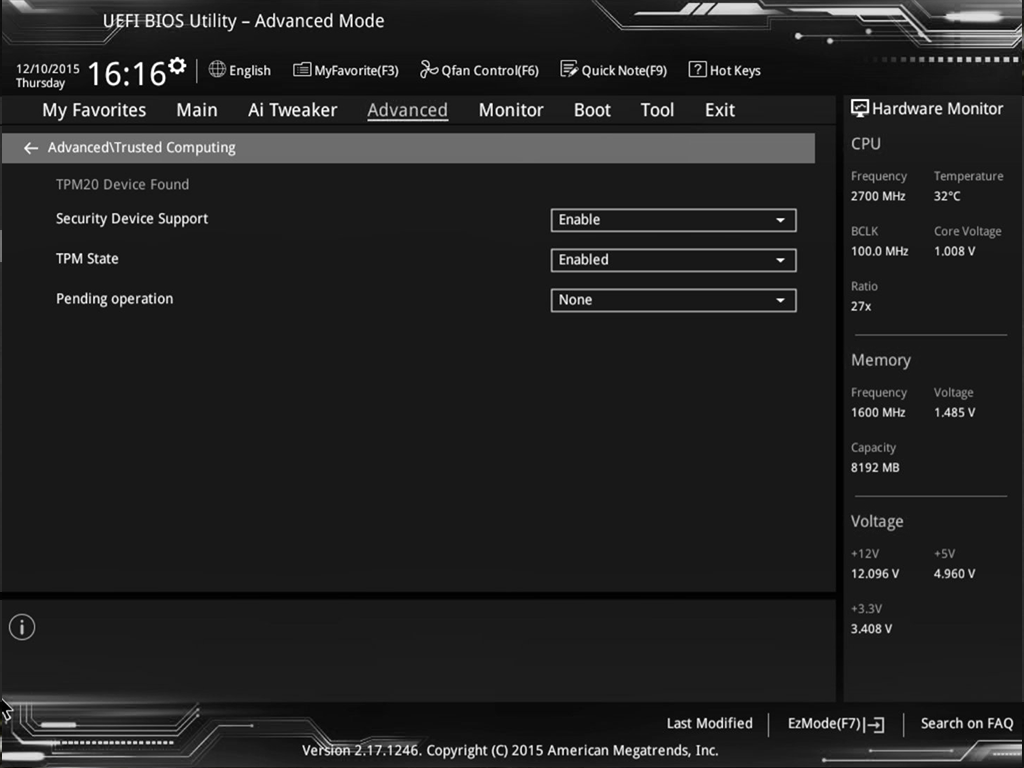
### 5. Disable TPM
* Locate the setting named *TPM*, or *Trusted Platform Module*, *Trusted Computing*, *Intel Platform Trust Technology*, etc., typically located in *Advanced* or *CPU* menus
* Disable TPM; set the TPM State to disabled.
Example of the ASUS BIOS.
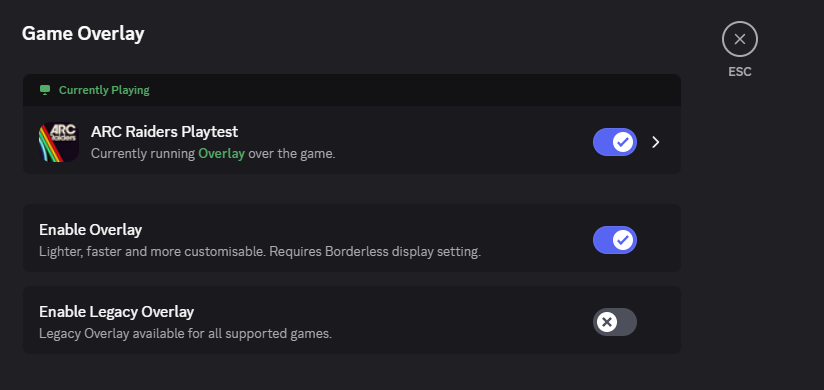
### 6. Configure Discord Overlay
* close Discord completely
* right click -> run Discord `as administrator`
* in Discord, click the `gear icon (settings)` -> `Game Overlay`
* enable `Enable Overlay`
* disable `Enable Legacy Overlay`
### 7. Setting up the Loader
* Download the loader file from [your order](https://account.dexa.im/orders)
{% hint style="danger" %}
The loader file is compressed (zipped) within a .zip. You must extract the entire folder and/or loader exe from the .zip file. **Do not run the loader from within the .zip.** You can use software like [WinRAR](https://www.win-rar.com/download.html) or [7ZIP](https://www.7-zip.org/download.html), or extract it using Windows (`right click` on the `.zip` -> `extract all`).
{% endhint %}
* Run `DEXAiM-BL.exe`
The DEXAiM-BL loader.
{% hint style="info" %}
Click the `Register/Redeem` button if you have never used this loader before.
{% endhint %}
* `Login` or `Register` an account, paste in your [license key from your order](https://account.dexa.im/orders)
* Select `ARC Raiders` from the `CHEAT SELECTOR` list, click `INJECT`
The CHEAT SELECTOR screen.
* Launch the game
* At the game's main menu, click `OK` on the popup dialog box from the loader.
{% hint style="success" %}
Setup complete!
{% endhint %}
## Need help with bans, VPNs, spoofers & more?
Take a look at our Resources page:
{% embed url="" %}
[^1]: For example: AVAST, AVG, McAfee, Malwarebytes, etc.
[^2]: For example: Riot Vanguard, ESEA, FACEIT, etc.
[^3]: Drag and drop or right click -> extract
---
# Agent Instructions
This documentation is published with GitBook. GitBook is the documentation platform designed so that both humans and AI agents can read, navigate, and reason over technical content effectively. Learn more at gitbook.com.
## Querying This Documentation
If you need additional information that is not directly available in this page, you can query the documentation dynamically by asking a question.
Perform an HTTP GET request on the current page URL with the `ask` query parameter, and the optional `goal` query parameter:
```
GET https://docs.dexa.im/non-dma-products/arc-raiders/rift/setup-guide.md?ask=&goal=
```
`ask` is the immediate question: it should be specific, self-contained, and written in natural language.
`goal` is optional and describes the broader end goal you are ultimately trying to accomplish on behalf of the user. GitBook uses it to tailor the answer towards what is most useful for that goal.
The response will contain a direct answer to the question and relevant excerpts and sources from the documentation.
Use this mechanism when the answer is not explicitly present in the current page, you need clarification or additional context, or you want to retrieve related documentation sections.
.jpg?alt=media&token=b8f4cebd-22c9-4fe4-a3b9-accfc517b7ce)