> For the complete documentation index, see [llms.txt](https://docs.dexa.im/llms.txt). Markdown versions of documentation pages are available by appending `.md` to page URLs; this page is available as [Markdown](https://docs.dexa.im/dma-products/eden/product-guides/arc-raiders.md).
# ARC Raiders
## Configs
Saved configs are stored at the following location: `C:\EdenDMA\Configs`
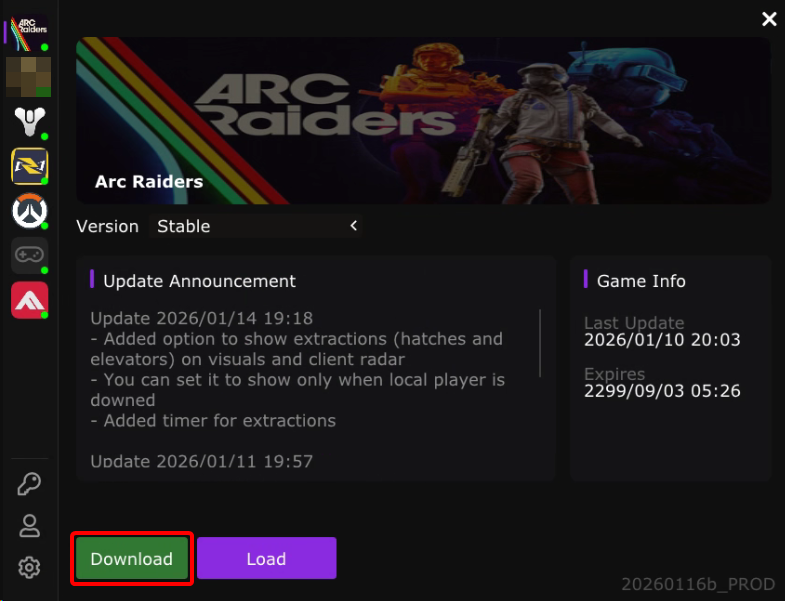
## Getting the asset files for Web Radar and Vis Check
Click `Download` in the loader once you have selected `Arc Raiders`
## Using the Web Radar
EDEN's ARC Raiders cheat features a web-based radar. This can be opened in a browser on another PC in your home network or remotely by a friend (must port-forward).
The ARC Raiders Radar.
{% stepper %}
{% step %}
### Download the assets
* on the DMA PC, make sure to download the assets as [instructed above](#getting-the-asset-files-for-web-radar-and-vis-check)
{% endstep %}
{% step %}
### Using the Radar
* while the cheat is running, press `DEL` to open the menu on the DMA PC
* navigate to `Radar` -> `Web Radar`
* leave the IP as `0.0.0.0` (it will bind to localhost)
* choose a port number from `0` to `65535`
* we recommend something like 40900
* leave `Connect to live server` unchecked unless running Linux
* click `Start Web Radar`
* in a web browser, navigate to `localhost:port` in a web browser on your DMA PC to view radar
{% hint style="info" %}
To share the web radar with friends, port forward in the router to the selected port and local IP address of the DMA PC. Set a static IP to prevent the IP changing.
To learn more about how to do this, Google or ask Gemini "how to port forward."
Dexaim does not provide support for port forwarding.
{% endhint %}
{% endstep %}
{% endstepper %}
## Using Vischeck
EDEN's ARC Raiders cheat features a powerful visual check feature utilizing ray-tracing to path out (and math out) all visible player models/bones/etc. obscured behind solid obstructions (like buildings, ground, etc.). If you are using the aimbot feature, we strongly recommend configuring vischeck.
{% stepper %}
{% step %}
### Download the assets
* on the DMA PC, make sure to download the assets as [instructed above](#getting-the-asset-files-for-web-radar-and-vis-check)
{% endstep %}
{% step %}
### Turn on Raytracing
* while the cheat is running, press `DEL` to open the menu on the DMA PC
* navigate to `Misc`-> `Raytracing`
* toggle on `Enabled`
{% endstep %}
{% endstepper %}
---
# Agent Instructions
This documentation is published with GitBook. GitBook is the documentation platform designed so that both humans and AI agents can read, navigate, and reason over technical content effectively. Learn more at gitbook.com.
## Querying This Documentation
If you need additional information that is not directly available in this page, you can query the documentation dynamically by asking a question.
Perform an HTTP GET request on the current page URL with the `ask` query parameter, and the optional `goal` query parameter:
```
GET https://docs.dexa.im/dma-products/eden/product-guides/arc-raiders.md?ask=&goal=
```
`ask` is the immediate question: it should be specific, self-contained, and written in natural language.
`goal` is optional and describes the broader end goal you are ultimately trying to accomplish on behalf of the user. GitBook uses it to tailor the answer towards what is most useful for that goal.
The response will contain a direct answer to the question and relevant excerpts and sources from the documentation.
Use this mechanism when the answer is not explicitly present in the current page, you need clarification or additional context, or you want to retrieve related documentation sections.